Melody class
Melody class#
This class is used for making/working with melodies..
- class thebeat.music.Melody(rhythm, pitch_names, octave=None, key=None, is_played=None, name=None)[source]#
A
Melodyobject contains a both a rhythm and pitch information. It does not contain sound. However, theMelodycan be synthesized and played or written to disk, for instance using thesynthesize_and_play()method.See the
__init__()to learn how aMelodyobject is constructed, or use one of the different class methods, such as thegenerate_random_melody()method.Most of the functions require you to install abjad. Please note that the current version of abjad requires Python 3.10. The last version that supported Python 3.6-3.9 is this one.
- __init__(rhythm, pitch_names, octave=None, key=None, is_played=None, name=None)[source]#
- Parameters
pitch_names (
Union[ndarray[Any,dtype[str]],list[str],str]) – An array or list containing note names. They can be in a variety of formats, such as"G4"for a G note in the fourth octave, or"g'", or simplyG. The names are processed byabjad.pitch.NamedPitch. Follow the link to find examples of the different formats. Alternatively it can be a string, but only in the formats:'CCGGC'or'C4C4G4G4C4'.key (
Optional[str], default:None) – Optionally, you can provide a key. This is for instance used when plotting aMelodyobject.is_played (
Optional[list], default:None) – Optionally, you can indicate if you want rests in theMelody. Provide an array or list of booleans, for instance:[True, True, False, True]would mean a rest in place of the third event. The default is True for each event.name (
Optional[str], default:None) – Optionally, theMelodyobject can have a name. This is saved to theMelody.nameattribute.
Examples
>>> r = thebeat.music.Rhythm.from_note_values([4, 4, 4, 4, 4, 4, 2])
>>> mel = Melody(r, 'CCGGAAG')
- classmethod generate_random_melody(n_bars=1, beat_ms=500, time_signature=(4, 4), key='C', octave=4, n_rests=0, allowed_note_values=None, rng=None, name=None)[source]#
Generate a random rhythm as well as a melody, based on the given parameters. Internally, for the rhythm, the
Rhythm.generate_random_rhythm()method is used. The melody is a random selection of pitch values based on the provided key and octave.- Parameters
n_bars (
int, default:1) – The desired number of musical bars.beat_ms (
int, default:500) – The value (in milliseconds) for the beat, i.e. the duration of a \(\frac{1}{4}\) th note if the lower number in the time signature is 4.time_signature (
tuple, default:(4, 4)) – A musical time signature, for instance:(4, 4). As a reminder: the upper number indicates how many beats there are in a bar. The lower number indicates the denominator of the value that indicates one beat. So, in(4, 8)time, a bar would be filled if we have four \(\frac{1}{8}\) th notes.key (
str, default:'C') – The musical key used for randomly selecting the notes. Only major keys are supported for now.octave (
int, default:4) – The musical octave. The default is concert pitch, i.e.4.n_rests (
int, default:0) – If desired, one can provide a number of rests to be inserted at random locations. These are placed after the random selection of note values.allowed_note_values (
Optional[list], default:None) – A list or array containing the denominators of the allowed note values. A note value of2means a half note, a note value of4means a quarternote etc. Defaults to[4, 8, 16].rng (
Optional[Generator], default:None) – Anumpy.random.Generatorobject. If not suppliednumpy.random.default_rng()is used.name (
Optional[str], default:None) – If desired, one can give the melody a name. This is for instance used when printing the rhythm, or when plotting the rhythm. It can always be retrieved and changed viaRhythm.name.
- Return type
Examples
>>> generator = np.random.default_rng(seed=123)
>>> m = Melody.generate_random_melody(rng=generator)
>>> print(m.note_values)
[16 16 16 16 16 16 16  8  8 16  8 16 16]
>>> print(m.pitch_names)
["a'", "g'", "c'", "c''", "d'", "e'", "d'", "e'", "d'", "e'", "b'", "f'", "c''"]
- property note_values#
This property returns the denominators of the note values in this sequence, calculated from the inter-onset intervals (IOIs). A note value of
2means a half note. A note value of4means a quarternote, etc. One triplet of three notes would be[12, 12, 12].Caution
Please note that this function is basic (e.g. there is no support for dotted notes etc.). That’s beyond the scope of this package.
Examples
>>> r = thebeat.music.Rhythm([500, 1000, 250, 250], time_signature=(4, 4), beat_ms=500)
>>> m = Melody(r, pitch_names='CCGC')
>>> print(r.note_values)
[4 2 8 8]
>>> r = thebeat.music.Rhythm([166.66666667, 166.66666667, 166.66666667, 500, 500, 500], beat_ms=500]
>>> print(r.note_values)
[12 12 12  4  4  4]
- plot_melody(filepath=None, key=None, suppress_display=False, dpi=600)[source]#
Use this function to plot the melody in musical notes. It requires lilypond to be installed. See
Rhythm.plot_rhythm()for installation instructions.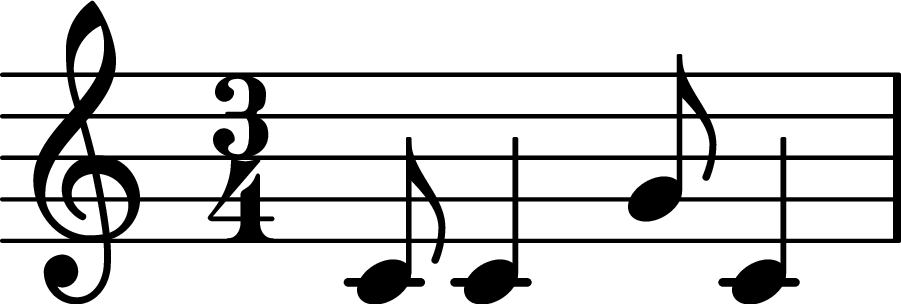
An example of a melody plotted with this method.#
- Parameters
filepath (
Union[PathLike,str,None], default:None) – Optionally, you can save the plot to a file. Supported file formats are only ‘.png’ and ‘.eps’. The desired file format will be selected based on what the filepath ends with.key (
Optional[str], default:None) – The musical key to plot in. Can differ from the key used to construct theMelodyobject. Say you want to emphasize the accidentals (sharp or flat note), you can choose to plot the melody in ‘C’. The default is to plot in the key that was used to construct the object.suppress_display (
bool, default:False) – If desired,you can choose to suppress displaying the plot in your IDE. This means thatmatplotlib.pyplot.show()is not called. This is useful when you just want to save the plot or use the returnedmatplotlib.figure.Figureandmatplotlib.axes.Axesobjects.dpi (
int, default:600) – The resolution of the plot in dots per inch.
- Return type
Examples
>>> r = thebeat.music.Rhythm(iois=[250, 500, 250, 500], time_signature=(3, 4))
>>> m = Melody(r, 'CCGC')
>>> m.plot_melody()
>>> m.plot_melody(filepath='mymelody.png', suppress_display=True)
>>> fig, ax = m.plot_melody(key='C', suppress_display=True)
- synthesize_and_play(event_durations_ms=None, fs=48000, n_channels=1, amplitude=1.0, oscillator='sine', onramp_ms=0, offramp_ms=0, ramp_type='linear', metronome=False, metronome_amplitude=1.0)[source]#
Since
Melodyobjects do not contain any sound information, you can use this method to first synthesize the sound, and subsequently have it played via the internally usedsounddevice.play().Note
Theoretically, four quarternotes played after each other constitute one long sound. This behaviour is the default here. However, in many cases it will probably be best to supply
event_durations, which means the events are played in the rhythm of the melody (i.e. according to the inter-onset intervals of the rhythm), but using a supplied duration.- Parameters
event_durations_ms (
Union[list[int],ndarray[Any,dtype[int]],int,None], default:None) – Can be supplied as a single integer, which means that duration will be used for all events in the melody, or as an array of list containing individual durations for each event. That of course requires an array or list with a size equal to the number of notes in the melody.fs (
int, default:48000) – The desired sampling frequency in hertz.n_channels (
int, default:1) – The desired number of channels. Can be 1 (mono) or 2 (stereo).amplitude (
float, default:1.0) – Factor with which sound is amplified. Values between 0 and 1 result in sounds that are less loud, values higher than 1 in louder sounds. Defaults to 1.0.oscillator (
str, default:'sine') – The oscillator used for generating the sound. Either ‘sine’ (the default), ‘square’ or ‘sawtooth’.onramp_ms (
int, default:0) – The sound’s ‘attack’ in milliseconds.offramp_ms (
int, default:0) – The sound’s ‘decay’ in milliseconds.ramp_type (
str, default:'linear') – The type of on- and offramp used. Either ‘linear’ (the default) or ‘raised-cosine’.metronome (
bool, default:False) – IfTrue, a metronome sound is added for playback. It usesMelody.beat_msas the inter-onset interval.metronome_amplitude (
float, default:1.0) – If desired, when writing the object with a metronome sound you can adjust the metronome amplitude. A value between 0 and 1 means a less loud metronome, a value larger than 1 means a louder metronome sound.
Examples
>>> mel = Melody.generate_random_melody()
>>> mel.synthesize_and_play()
>>> mel.synthesize_and_play(event_durations_ms=50)
- synthesize_and_return(event_durations_ms=None, fs=48000, n_channels=1, amplitude=1.0, oscillator='sine', onramp_ms=0, offramp_ms=0, ramp_type='linear', metronome=False, metronome_amplitude=1.0)[source]#
Since
Melodyobjects do not contain any sound information, you can use this method to synthesize the sound. It returnes a tuple containing the sound samples as a NumPy 1-D array, and the sampling frequency.Note
Theoretically, four quarternotes played after each other constitute one long sound. This behaviour is the default here. However, in many cases it will probably be best to supply
event_durations, which means the events are played in the rhythm of the melody (i.e. according to the inter-onset intervals of the rhythm), but using a supplied duration.- Parameters
event_durations_ms (
Union[list[int],ndarray[Any,dtype[int]],int,None], default:None) – Can be supplied as a single integer, which means that duration will be used for all events in the melody, or as an array of list containing individual durations for each event. That of course requires an array or list with a size equal to the number of notes in the melody.fs (
int, default:48000) – The desired sampling frequency in hertz.n_channels (
int, default:1) – The desired number of channels. Can be 1 (mono) or 2 (stereo).amplitude (
float, default:1.0) – Factor with which sound is amplified. Values between 0 and 1 result in sounds that are less loud, values higher than 1 in louder sounds. Defaults to 1.0.oscillator (
str, default:'sine') – The oscillator used for generating the sound. Either ‘sine’ (the default), ‘square’ or ‘sawtooth’.onramp_ms (
int, default:0) – The sound’s ‘attack’ in milliseconds.offramp_ms (
int, default:0) – The sound’s ‘decay’ in milliseconds.ramp_type (
str, default:'linear') – The type of on- and offramp_ms used. Either ‘linear’ (the default) or ‘raised-cosine’.metronome (
bool, default:False) – IfTrue, a metronome sound is added to the samples. It usesMelody.beat_msas the inter-onset interval.metronome_amplitude (
float, default:1.0) – If desired, when synthesizing the object with a metronome sound you can adjust the metronome amplitude. A value between 0 and 1 means a less loud metronome, a value larger than 1 means a louder metronome sound.
- Return type
Examples
>>> mel = Melody.generate_random_melody()
>>> samples, fs = mel.synthesize_and_return()
- synthesize_and_write(filepath, event_durations_ms=None, fs=48000, n_channels=1, amplitude=1.0, oscillator='sine', onramp_ms=0, offramp_ms=0, ramp_type='linear', metronome=False, metronome_amplitude=1.0)[source]#
Since
Melodyobjects do not contain any sound information, you can use this method to first synthesize the sound, and subsequently write it to disk as a wave file.Note
Theoretically, four quarternotes played after each other constitute one long sound. This behaviour is the default here. However, in many cases it will probably be best to supply
event_durations, which means the events are played in the rhythm of the melody (i.e. according to the inter-onset intervals of the rhythm), but using a supplied duration.- Parameters
filepath (
Union[str,PathLike]) – The output destination for the .wav file. Either pass e.g. aPathobject, or a string. Of course be aware of OS-specific filepath conventions.event_durations_ms (
Union[list[int],ndarray[Any,dtype[int]],int,None], default:None) – Can be supplied as a single integer, which means that duration will be used for all events in the melody, or as an array of list containing individual durations for each event. That of course requires an array or list with a size equal to the number of notes in the melody.fs (
int, default:48000) – The desired sampling frequency in hertz.n_channels (
int, default:1) – The desired number of channels. Can be 1 (mono) or 2 (stereo).amplitude (
float, default:1.0) – Factor with which sound is amplified. Values between 0 and 1 result in sounds that are less loud, values higher than 1 in louder sounds. Defaults to 1.0.oscillator (
str, default:'sine') – The oscillator used for generating the sound. Either ‘sine’ (the default), ‘square’ or ‘sawtooth’.onramp_ms (
int, default:0) – The sound’s ‘attack’ in milliseconds.offramp_ms (
int, default:0) – The sound’s ‘decay’ in milliseconds.ramp_type (
str, default:'linear') – The type of on- and offramp used. Either ‘linear’ (the default) or ‘raised-cosine’.metronome (
bool, default:False) – IfTrue, a metronome sound is added to the output file. It usesMelody.beat_msas the inter-onset interval.metronome_amplitude (
float, default:1.0) – If desired, when playing the object with a metronome sound you can adjust the metronome amplitude. A value between 0 and 1 means a less loud metronome, a value larger than 1 means a louder metronome sound.
Examples
>>> mel = Melody.generate_random_melody()
>>> mel.synthesize_and_write(filepath='random_melody.wav')